Neu in WP 7.0 Easy Peasy.
Optionen im Block-Inspektor
- Show home breadcrumb
- Show current breadcrumb
- Trennzeichen (Standard ist
/)
Plus ein bisschen Gestaltung. Haupteinsatzgebiet ist wohl das Template Einzelner Beitrag (engl. Single Post).
Neu in WP 7.0 Easy Peasy.
Optionen im Block-Inspektor
/) Plus ein bisschen Gestaltung. Haupteinsatzgebiet ist wohl das Template Einzelner Beitrag (engl. Single Post).
Pattern editing und contentOnly interactivity. Didn’t get it at first, aber es ist richtig gut. Besonders für Einsteiger.
Nach dem Einfügen bleibt es eine Vorlage und in der Listenansicht steht nach wie vor der Name der Vorlage. Zentrierte Überschrift. Mit dem Symbol für eine Vorlage.
Wie Blumen, die an unerwarteten Orten blühen, entfaltet sich jede Geschichte mit Schönheit und Widerstandsfähigkeit und offenbart verborgene Wunder.
Wenn ich irgendwo in die Vorlage klicke, kann ich die Inhalte ändern. Rechts im Block-Inspektor erscheinen aber nur Optionen zum Bearbeiten der Vorlage, nicht die einzelnen Blöcke. Klasse.
Für die Vorlage gibt es drei Tabs:
Alle anderen Optionen wie Abstände etc. erscheinen erst, wenn man auf Vorlage bearbeiten klickt. Das bezieht sich dann aber anders als bei synchronisierten Vorlagen nur auf diese Vorlage.
Fleurs ist ein Blumenversand- und Abonnement-Unternehmen. Mit Sitz in der EU haben wir es uns zur Aufgabe gemacht, nicht nur atemberaubende Blumenarrangements zu liefern, sondern auch das Wissen und die Begeisterung für das schöne Geschenk der Natur zu fördern: Blumen.

Introduced in WP 7.0. On Github.
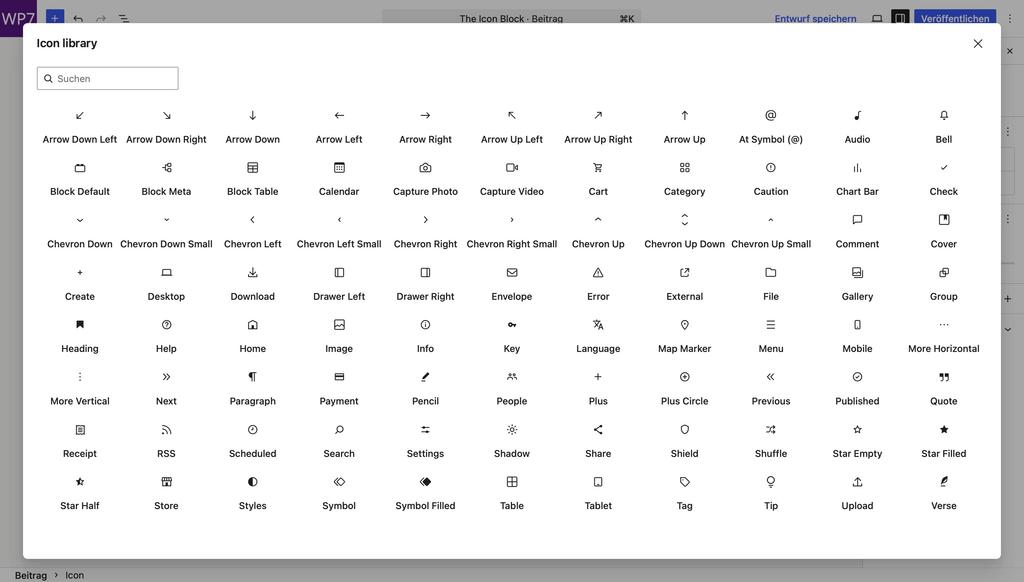
After inserting an Icon block you click on Choose icon to see the following overview (defined in #16484):
After inserting it an icon displays in its own row as a block:
To use it next to text you have to wrap it in a row block:
Icon of a video camera. If the text is longer than a row it will wrap and the next line aligns with the rest of the text. It almost looks like a list.
The default block spacing looks good with this and you can vertically align the icon. The color and the width of the icon can be defined. You’re looking at a blue 3rem icon.
To have paragraphs in the text you will have to group or stack the text.
Nick Diego’s Icon block had the ability to upload new SVG Icons:
One thing that I have been thinking about how to handle SVG uploads. To be clear, I don’t think we should enable SVG uploads in core – that’s another conversation entirely and beyond the scope of this work.
That being said, the existing code from the Icon Block plugin does a mime type check to see if SVG uploads have been enabled and provides the UI to upload them. IMO, this is a big win for extenders and I would love to see it stay in the block.
Ryan Welcher on Github
However, I installed Safe SVG, and I can’t find anything.
After some reading I found that in order to enable an SVG Icon registration API in a future WordPress release the ability to upload icons was removed:
Remove the SVG upload and custom icon creation features. To help users understand and edit SVGs, more discussion may be needed from a design and accessibility perspective.
t-hamano on Github
So at the moment that is someday maybe.
Discussed in issue #75715 SVG Icon API: Iteration for WordPress 7.1.
I see two shortcomings in the version shipping with WP 7.0:
MikeMcAlister points out that without Custom Icons it’s not very useful:
Thanks for everyones work on this so far! I agree with the others, the ability to register a custom icon set will be critical. Builders and agencies will want to ship custom icon sets for their clients and product creators will want to ship custom icon sets for their user base.
Mike McAlister on #75715
Once inline SVG-Icons will be possible, it will be possible to add an icon to the Buttons block (t-hamano on #75715)
Da eine komplette Überarbeitung von WP-Admin auf Basis von React (so wie der Website-Editor) eine riesige Aufgabe ist, hatte Fabian Kaegy vor 3 Monaten eine Coat-of-Paint-Überarbeitung vorgeschlagen:
Das Ziel beschreibt er so:
The goal is to modernize the admin’s appearance, reduce inconsistencies between old screens and the newer block editor / site editor screens, and better align it with the WordPress design system
Dabei geht es um eine rein visuelle Überarbeitung der Komponenten:
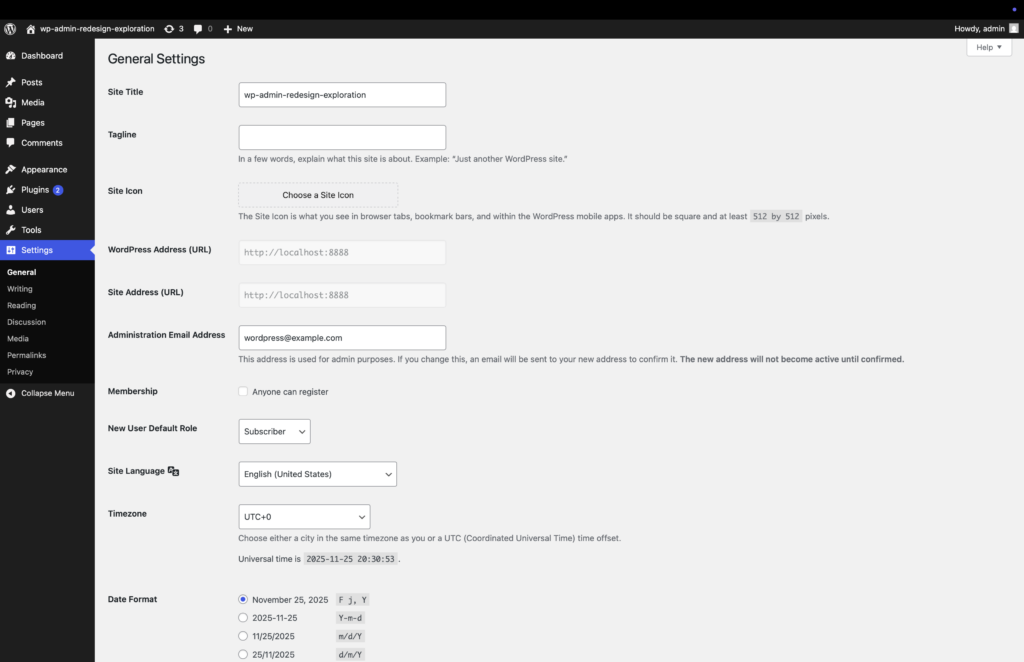
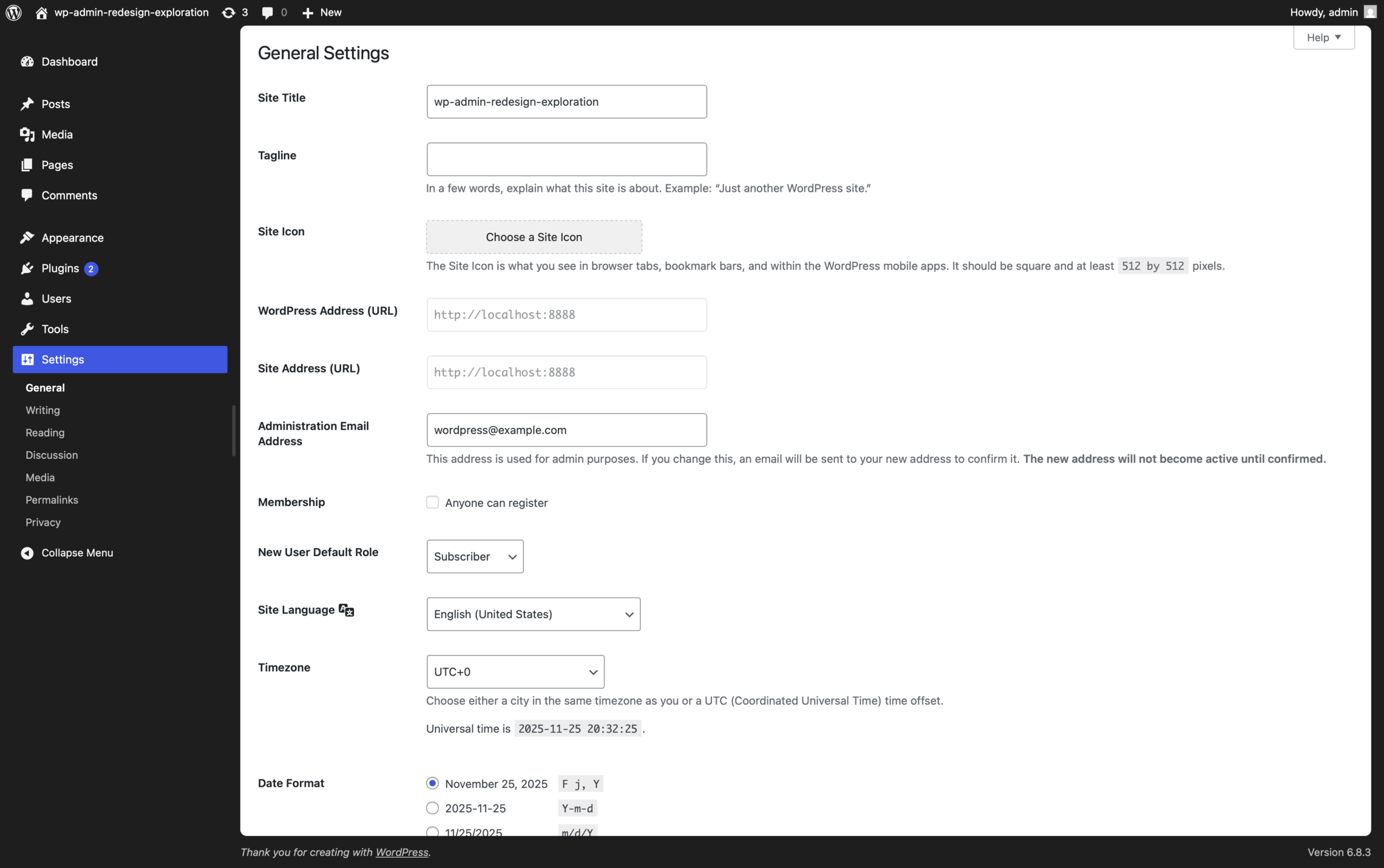
Das bisherige Modern-Farbschema ist jetzt Standard. Das alte Schema fehlt ganz und ist im Benutzerprofil auch nicht mehr sichtbar.
Die aktuelle Version (links) hat nur ein bisschen anderes Spacing, ist aber nicht wirklich eine Angleichung an den Site-Editor. Eigentlich wollte er es etwas modernisieren (links), aber das hat aus zeitlichen Gründen nicht geklappt. Schade eigentlich …
Vor ca. vier Wochen schrieb Fabian:
Additionally at this point we believe that the larger „Frame“ is very unlikely to make it into 7.0. I personally still want to create a PR for it so we can at least test the various changes and see the holistic vision. But given we are already 4 weeks away from Beta 1 that seems like a stretch.
https://core.trac.wordpress.org/ticket/64308#comment:13
So wirkt das ein bisschen halbgar, und wahrscheinlich kommen der größere Frame und die bewegliche Sidebar dann in 7.1, sodass meine Screenshots nicht mehr stimmen. We’ll see.
WordPress 7.0 gives the wp-admin experience a boost with a fresh default color scheme, and a cleaner, more modern looking dashboard, while keeping the interface familiar. The upgraded dashboard enhances the editing experience with new visual revision comparisons, and smooth transitioning between screens.
https://wordpress.org/news/2026/02/wordpress-7-0-beta-1/
- Visual Revisions: Working with revisions is even better in 7.0 with the added ability to make visual comparisons to revision versions within the editor.
- View transitions: Cross-document view transitions in the dashboard offer visual continuity with seamless movement from screen to screen.
Besser als nix, aber doch ziemlich wenig. Ich hatte gehofft, dass zumindest die Modernisierung der linken Sidebar und die Angleichung an den Site-Editor drin sein würden.